- Products
- MovieSlate
- Maildash
- BigTipper
- TuTuneMe
- Services
- Profile
- Contact

What cables do I need to sync timecode between cameras and MovieSlate? With the in-app purchase of MovieSlate's optional "Timecode Sync PRO" module, your MovieSlate can accept LTC timecode from external audio sources, or you can use MovieSlate as a timecode generator.
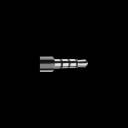
Attenuation may require a bit of trial and error. Not all sound sources (cameras, TC generators, and sound recorders) output audio at the same volume levels. If your sound source has an output volume control, then it is easy to test using MovieSlate’s test screen (see “Try Before You Buy” above). While viewing MovieSlate’s test screen, simply adjust the soure source’s volume until the test screen levels are green and timecode appears in the test screen. Some sound sources don't have a way to control their output volume. In these cases, if you find that the volume is too high for the Apple iOS device, then you'll need to also purchase an attenuating cable-- such as the ones described below. Sources for Required Cables You’ll need cables running from your camera or TC generator to the iPad/iPhone/iPod headphone jack. The iPad/iPhone/iPod end of the cable must be a four connection mini jack (four visible bands; just like the jack used on Apple's iPhone headphones). The audio signal needs to be at MIC level-- not LINE level which would overpower an iPad/iPhone/iPod headphone jack input. Many cameras output their audio signal at MIC level already. If your camera’s LTC audio output is at LINE level or is too loud, you will have to attenuate the audio signal. For instance, we've been testing with external Horita timecode generators that export audio at LINE level, and so we've been using this set of cables: iPhone Adapter 3.5mm 4 conductor TRRS Male to 1/4in Microphone Input Jack with built-in -22db Attenuator http://www.kvconnection.com/product-p/km-iphone-mic42-a22.htm RCA female Jack to 1/4 Mono Phone Plug http://www.kvconnection.com/product-p/d-ad170-6.htm RCA male to RCA male cable. http://www.kvconnection.com/product-p/t-p-p-3.htm This discussion on Apple's boards reveals the pinouts: http://discussions.apple.com/message.jspa?messageID=5262651 BNC to iOS Device Timecode cable. This cable is designed specifically for use with MovieSlate. http://www.kvconnection.com/product-p/km-iphone-bnc-a22.htm BNC-to-RCA adapters. We don't have access to equipment with BNC connections to test with, however we believe that a simple BNC-to-RCA adapter will work without problems (provided you get the signal level right, of course). If you have had success with these adapters we'd appreciate a quick note letting us know! BNC Female to RCA Male adapter. http://www.kvconnection.com/product-p/d-ad140-17-bncf-rcam.htm BNC Male to RCA Female adapter. http://www.kvconnection.com/product-p/d-ad170-5-1.htm If your equipment uses XLR connectors: http://www.kvconnection.com/product-p/km-iphone-micx-a22.htm Folks looking to integrate the TC over Sennheiser wireless mic receiver: http://www.kvconnection.com/product-p/km-iphone-mic-sen.htm Folks with RCA-style LINE OUT on their gear: http://www.kvconnection.com/product-p/km-iphone-micp-a22.htm If your gear is outputting MIC level signal you can use one of KVConnection's MIC adapters without the built-in attenuator: http://www.kvconnection.com/iPhone-Adapters-s/8388.htm Folks in the UK should check with MLEC (UK) Ltd. They've custom built cables for other MovieSlate users-- including those using Sound Devices recorders. LEMO. Sigh. We don't have any equipment that uses LEMO connections right now so we can't guide you to any tested solutions, and we don't have many leads on LEMO adapters. Here's what we've dug up so far, depending on your variant of LEMO: 3-pin LEMO to XLR Adapter: (LEMO to XLR, then use one of the XLR adapters above) http://www.fullcompass.com/product/284060.html 5-pin LEMO to 3p XLR M/F adapter: http://www.canford.co.uk/Products/79-2252_SOUND-DEVICES-XL-LX-TIMECODE-CABLE-Lemo-5-pin-to-1x-XLR-3M-1x-XLR-3F-610mm355mm Mouser Electronics is an authorized distributor of LEMO products: http://www.mouser.com/lemo/?utm_source=google&utm_medium=ppc&utm_campaign=connectors&gclid=CIfcvNeUraQCFRD_iAodORAncg Remote Audio has a few TRRS to XLR, LEMO, and BNC adapters, we haven't used any of these but they look pretty slick: http://www.remoteaudio.com/cables_adapters/idevice/ Location Sound may be able to assist with adapter chains: http://www.locationsound.com And finally, the source: http://www.lemo.com A Wireless Solution Many folks have had success sending timecode audio to/from MovieSlate wirelessly using transmitters and receivers like those from Comtek. A common workflow is to cable-connect the LTC output from a sound recorder to a wireless transmitter. Then cable-connect a wireless receiver to the iOS device(s) running MovieSlate. Trew Audio often has good deals on used Comtek gear. |
| One of many FAQs offered. |
|
Movie★Slate +
Visit Movie-Slate.com
KeyClips |
Services
|
Profile
|
Support
|